
Maharashtra Chief Electoral Officer (CEO) have officially published the SIR 2026 Draft Voter List (Electoral Roll) on 31st August 2026. Following weeks of comprehensive door-to-door verification conducted by Booth Level Officers (BLOs) across all 36 districts of Maharashtra, the draft electoral roll is now available online in PDF format for public inspection.
Election Commission has opened a month-long claims and objections window from 31 August 2026 to 30 September 2026. During this period, you can easily add your missing name, fix spelling errors, update your address, or ensure your family members are listed in the correct polling booth before the Final Electoral Roll is published on 4th November 2026.
DOWNLOAD NOW : Maharashtra SIR 2026 Draft Voter List PDF
Also See :-
• Maharashtra SIR Deleted Voter List 2026 (ASDD List PDF)
• Maharashtra 2002 Voter List PDF (Old SIR Electoral Roll)
How to Download Maharashtra SIR Draft Voter List 2026 PDF from Official Portal
STEP 1: Visit the official portal of CEO Maharashtra at ceoelection.maharashtra.gov.in.
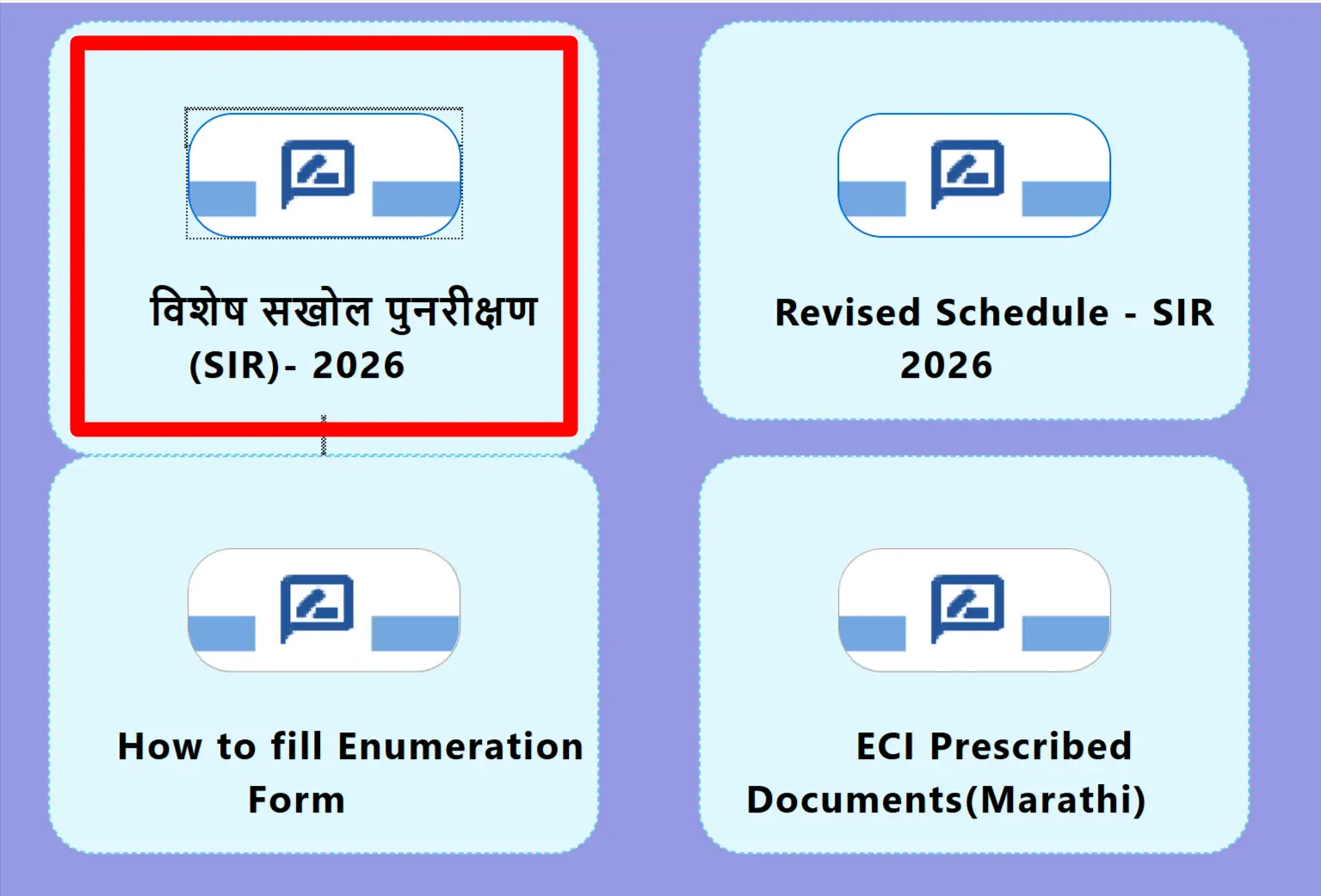
STEP 2: On the homepage, locate and click on the "SIR - 2026" (विशेष सखोल पुनरीक्षण) or "Draft Electoral Roll 2026" link.
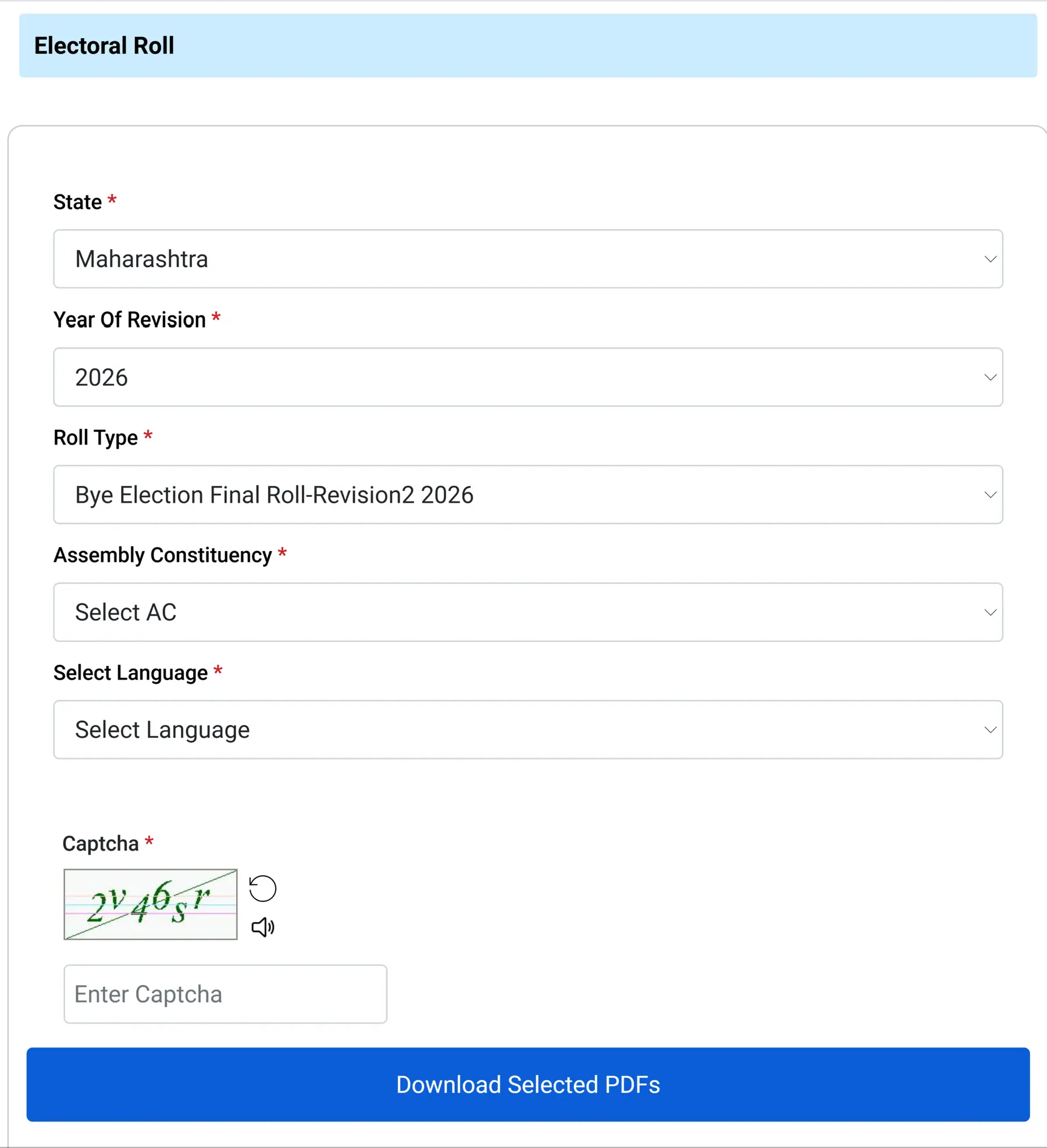
STEP 3: After clicking on the link, you will be redirected to the ECI website. There, you need to select the State, Year of Revision, Roll Type, District, Assembly Constituency, and Language, as shown in the screenshot below.
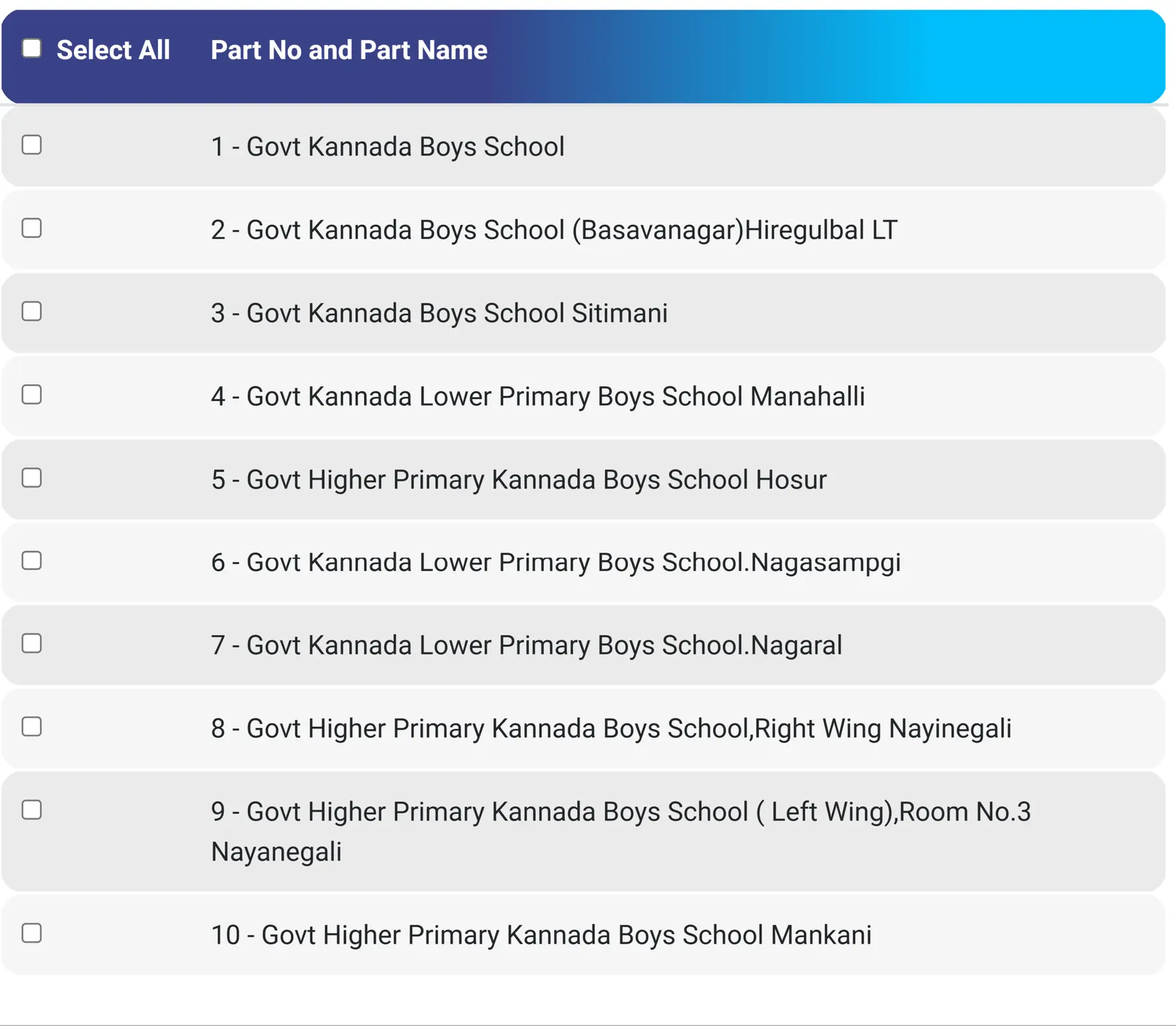
STEP 4: Find your Polling Station / Part Number from the list and click the download icon next to your booth.
STEP 5: Wait for the Download Progress to complete. All selected PDFs will download automatically

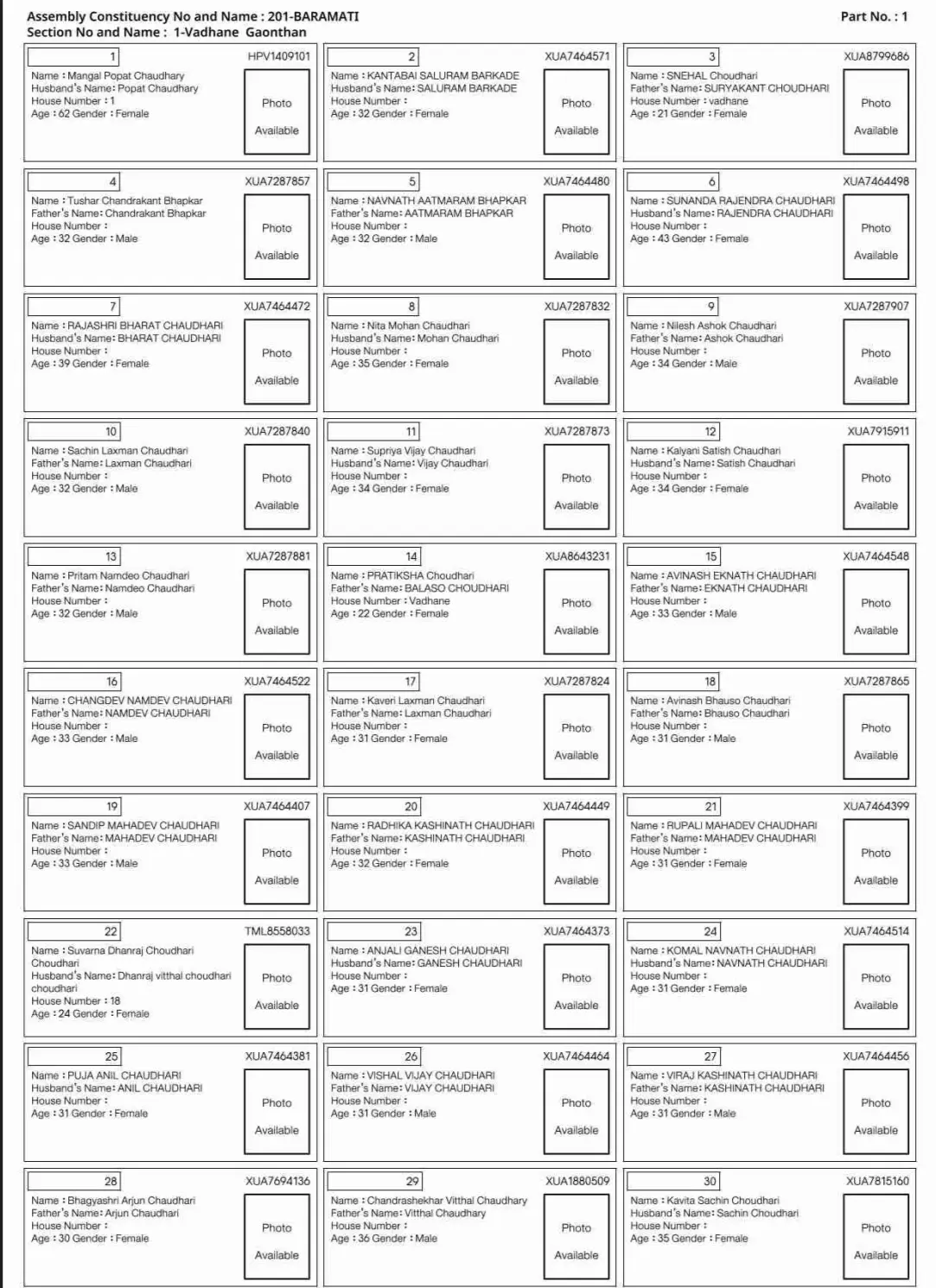
STEP 6: Save the downloaded PDF on your mobile or computer. After saving, the file will look similar to the sample below:
How to Search Your Name Instantly in Maharashtra Voter List (Without Downloading PDF)
If you don't know your part number or booth details, you can search for your name directly in seconds using the official ECI Electoral Search engine:
- Search by EPIC Number (Fastest): Visit electoralsearch.eci.gov.in, click on "Search by EPIC", enter your 10-digit Voter ID (EPIC) number, select state as Maharashtra, and type the captcha. You will immediately see your polling station, part number, and serial number.
- Search by Personal Details: Click on "Search by Details", enter your First Name, Last Name, Relative's Name, Age/DOB, District, and Assembly Constituency to locate your entry.
- Search by Mobile Number: If your mobile number is linked with your Voter ID, enter your mobile number and submit the OTP to fetch your complete voter profile.
Maharashtra SIR 2026 Draft Voter List – Key Dates & Schedule
Here is the official timeline released by CEO Maharashtra and ECI for the Special Intensive Revision (SIR) 2026 exercise:
| Event / Activity | Official Date / Timeline |
|---|---|
| Publication of Draft Electoral Roll (SIR 2026) | 31st August 2026 |
| Period for Filing Claims & Objections (Forms 6, 7, 8) | 31st August 2026 to 30th September 2026 |
| Special Campaign Dates at Polling Stations | Weekends in September 2026 (Notified by DEOs) |
| Disposal of Claims and Objections by EROs | By 29th October 2026 |
| Checking of Health Parameters & Final Approval | By 1st November 2026 |
| Final Publication of Electoral Roll 2026 | 4th November 2026 |
| Official Websites | ceoelection.maharashtra.gov.in & voters.eci.gov.in |
| Toll-Free Voter Helpline | 1950 |
What to Do If Your Name is Missing or Has Errors (Forms Explained)
If you check the draft voter list and find an issue, don't worry! The Election Commission provides simple forms to rectify any problem during the claims and objections period (31 August to 30 September 2026):
- Form 6 (Application for New Voter Registration / Inclusion): Use this form 6 if you have turned 18 years of age, if you are a newly eligible voter, or if your name was unexpectedly deleted / missing from the draft list.
- Form 7 (Application for Objection / Deletion): Use this form if you want to request deletion of a name (e.g., due to the death of a family member, permanent relocation to another state, or duplicate entry).
- Form 8 (Correction of Entries & Shifting of Residence): Use this form to fix any typographical errors in your name, father's/spouse's name, gender, date of birth/age, address, or to update your latest photograph. It is also used if you have shifted residence within the same assembly constituency or to a new constituency in Maharashtra.
How to Submit Your Claim or Objection (Online & Offline)
Online Submission:
- Log in to the official ECI portal at voters.eci.gov.in or download the ECI Voter Helpline App from Google Play Store / Apple App Store.
- Choose the relevant form (Form 6, 7, or 8).
- Upload necessary self-attested documents (Aadhaar, address proof, age proof, and photo).
- Submit the form and keep the reference acknowledgement number to track the status.
Offline Submission:
- Collect physical copies of Form 6, 7, or 8 from your local Booth Level Officer (BLO), Taluka / Tehsil Office, or the Electoral Registration Officer (ERO) office.
- Fill out the details, attach self-attested copies of your ID and address proof, and submit it to your BLO or the ERO office before 30th September 2026.
Maharashtra Assembly Wise SIR Helpline Numbers
If you encounter any difficulty checking your name, accessing PDF files, or contacting your BLO, you can call the toll-free voter helpline at 1950 (available in Marathi, Hindi, and English). Additionally, check the official district helpline contact directories below:
| Name of District | Help Desk Details |
|---|---|
| Ahilyanagar | View Details |
| Akola | View Details |
| Amravati | View Details |
| Beed | View Details |
| Bhandara | View Details |
| Buldhana | View Details |
| Chhatrapati Sambhaji Nagar | View Details |
| Chandrapur | View Details |
| Dharashiv | View Details |
| Dhule | View Details |
| Gondia | View Details |
| Gadchiroli | View Details |
| Hingoli | View Details |
| Jalgaon | View Details |
| Jalna | View Details |
| Kolhapur | View Details |
| Latur | View Details |
| Mumbai City | View Details |
| Mumbai Suburban | View Details |
| Nagpur | View Details |
| Nanded | View Details |
| Nandurbar | View Details |
| Nashik | View Details |
| Palghar | View Details |
| Parbhani | View Details |
| Pune | View Details |
| Raigad | View Details |
| Ratnagiri | View Details |
| Sangli | View Details |
| Satara | View Details |
| Sindhudurg | View Details |
| Solapur | View Details |
| Thane | View Details |
| Wardha | View Details |
| Washim | View Details |
| Yavatmal | View Details |
