
Election Commission of India (ECI) has completed the SIR process and released the 2026 draft and final voter lists for 12 States and UTs, namely Assam, Chhattisgarh, Goa, Gujarat, Kerala, Uttar Pradesh, West Bengal, Madhya Pradesh, Rajasthan, Bihar, Puducherry, and Lakshadweep.
ECI has also announced the 3rd Phase SIR 2026 schedule for 16 States and 3 Union Territories to update and verify electoral rolls across the country. Voters can easily check their details in the electoral roll by searching with their EPIC Number, one of the fastest and easiest ways to verify voter information online.
SIR 2026 Draft Roll Released for the following States & UTs
| S. No | State / Union Territory |
|---|---|
| 1 | Odisha |
| 2 | Manipur |
| 3 | Mizoram |
| 4 | Sikkim |
| 5 | Uttarakhand |
| 6 | Dadar & Nagar Haveli |
| 7 | Andhra Pradesh |
| 8 | Haryana |
| 9 | Jharkhand |
| 10 | Meghalaya |
| 11 | Telangana |
| 12 | Karnataka |
| 13 | Delhi |
| 14 | Maharashtra |
SIR Final Electoral Roll 2026 Released for 12 States & UTs
| S. No | State / Union Territory |
|---|---|
| 1 | Assam |
| 2 | Chhattisgarh |
| 3 | Goa |
| 4 | Gujarat |
| 5 | Kerala |
| 6 | Uttar Pradesh |
| 7 | West Bengal |
| 8 | Madhya Pradesh |
| 9 | Rajasthan |
| 10 | Bihar |
| 11 | Puducherry |
| 12 | Lakshadweep |
How to Check Your Name 2026 Voter List by EPIC Number from voters.eci.gov.in
STEP 1: Visit the ECI official website voters.eci.gov.in
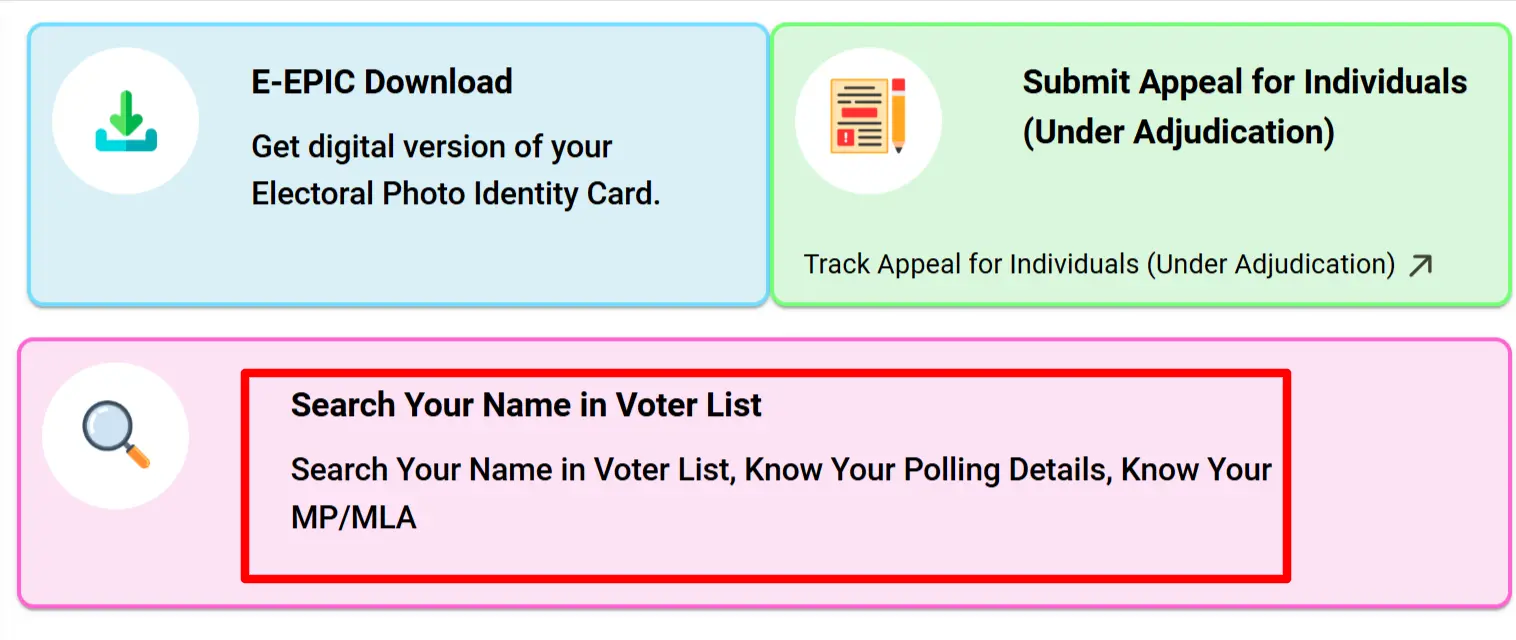
STEP 2: On the Homepage you will find the "Search Your Name in Voter List" link as shown in similar screen below.
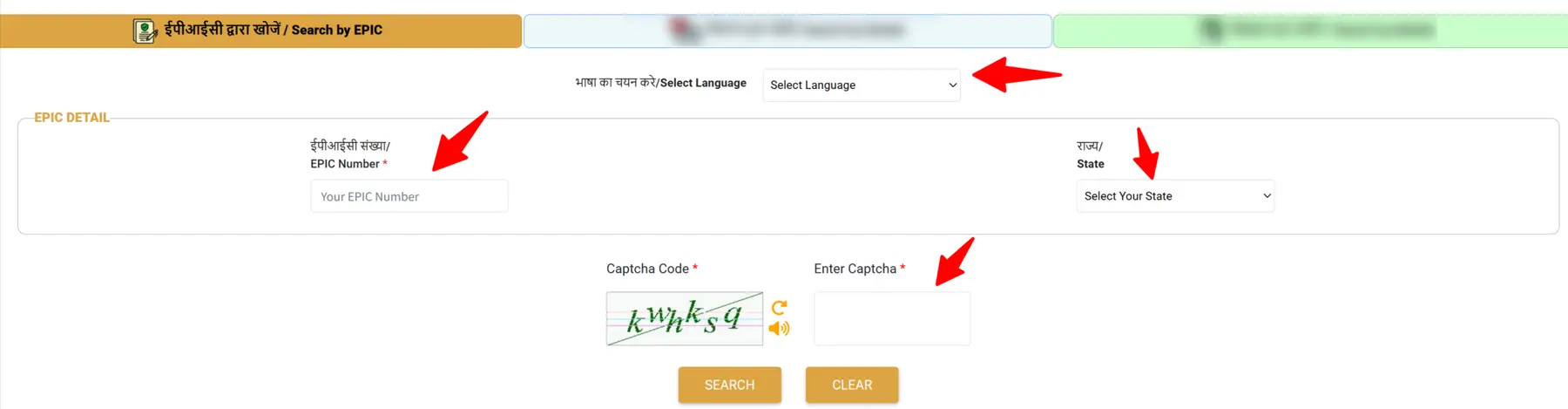
STEP 3: On the next page, choose your preferred language and enter your EPIC Number (Voter ID Number) in the required field. Then click on the “Next” button.
After that, enter the captcha code shown on the screen and click “Search” to view your voter details. You can refer to the image below for a step-by-step guide.
STEP 4: After the EPIC details are displayed, you have to click on "View Details" as shown in below image.

STEP 5: On the next page, your voter details will be displayed. Click on “Print Voter Information” to download your EPIC. The PDF will be saved in your download folder, as shown below.

Voter ID Search by Details (Name, Relative and DOB)
STEP 1: Open official site at https://voters.eci.gov.in
STEP 2: At the homepage of the website you have to click on “Search Your Name in Voter List”

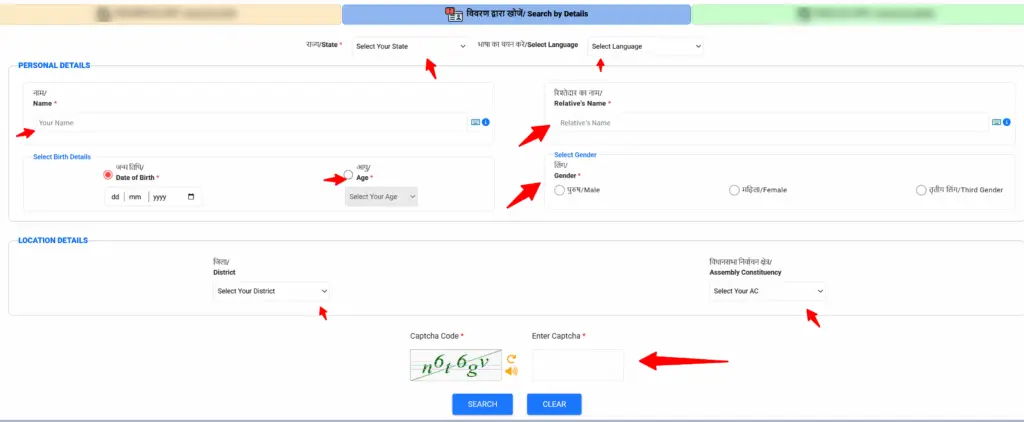
STEP 3: After that a new window is open in which you have to select “Search by Details“

STEP 4: Now Enter your Name, Relative’s Name, Date of Birth or Age, Gender. Select your state State, and optionally select District and AC from drop-downs and enter Captcha, then click SEARCH.
Voter ID Search by Mobile Number (OTP method)
STEP 1: Open official site: https://voters.eci.gov.in
STEP 2: At the homepage of the website you have to click on “Search Your Name in Voter List”
STEP 3: After that a new window is open in which you have to select “Search by Mobile”. If mobile number is linked with voter record, use Search by Mobile on site

STEP 4: After entering mobile number, OTP will be received on given mobile number, verify it and then details of the voter ID linked with that mobile number will be displayed.
If mobile number is not linked with the Voter ID card, this method will not work. You can log in to ECI voters portal and update mobile number and link it to your voter ID
