
Election Commission of India (ECI) has launched the Special Intensive Revision (SIR) 2026 programme to update and verify electoral rolls across several states and Union Territories. As part of the Special Intensive Revision (SIR) 2026 exercise, Booth Level Officers (BLOs) are conducting door-to-door visits to verify voter details and ensure that electoral rolls remain accurate and up to date.
| Start Date | State / Union Territory |
|---|---|
| 30 May 2026 | Manipur, Odisha, Sikkim, Mizoram |
| 4 June 2026 | Dadra & Nagar Haveli and Daman & Diu (DNH & DD) |
| 8 June 2026 | Uttarakhand |
| 15 June 2026 | Andhra Pradesh, Arunachal Pradesh, Haryana, Chandigarh |
| 25 June 2026 | Telangana, Punjab |
Voters can also fill and submit the SIR Enumeration Form online through voters.eci.gov.in. If you want to complete the process from home, simply follow the steps given below.
Also Check - Odisha 2002 Voter List PDF / Manipur 2005 Voter List PDF / Sikkim 2002 Voter List PDF /Mizoram 2005 Voter List PDF
Process to Submit SIR Form Online at voters.eci.gov.in - Complete Step-by-Step
STEP 1: Visit the official ECI website voters.eci.gov.in
STEP 2: On the Homepage, you will find the "Fill Enumeration Form" as shown in below screenshot.

STEP 3: Enter your Mobile Number or EPIC Number along with the captcha code. Click on "Request OTP" and enter the OTP received on your registered mobile number to log in. If your mobile number is not registered on the ECI portal, first click on the "Sign Up" button and create your account.

STEP 4: After logging in, select your state from the list provided. Next, enter your EPIC (Voter ID) number and click on the "Search" button to view your voter details.

STEP 5: Now voter details will automatically appear on the screen. Verify the information, enter your mobile number, and click on the "Send OTP" button. Then enter the OTP received on your mobile number to complete the verification and continue with the form.

STEP 6: Select one category
- My name exists in Electoral Roll of last SIR (You cannot mark as self.)
- My parents name (Father, Mother, Grandfather, Grandmother) exists in the electoral roll of SIR (2002/2003/2005)
- My parents name (Father, Mother, Grandfather, Grandmother) exists in the electoral roll of SIR 2025/2026
- Neither my name nor my parents name exists in the electoral roll of last SIR
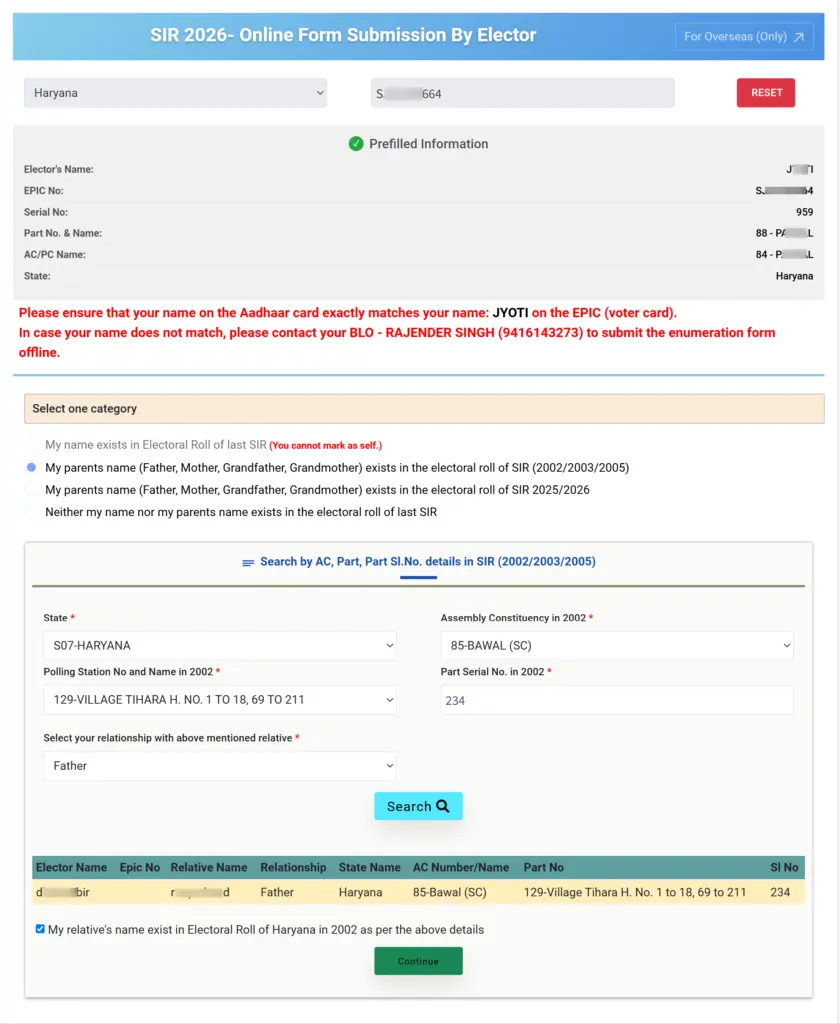
STEP 7: Give Relative details if name is not present in Last SIR

STEP 8: Now you have to do the Aadhaar verification

How to Submit SIR Form 2026 Through BLO at Your Home
Step 1: Go the official website of ECI https://voters.eci.gov.in
Step 2: On the homepage of the website you have to click on "Book a Call with BLO"

Step 3: Then you have to enter your mobile number to login. After that you have to enter your EPIC number and click on search button.

Step 4: Now you request has been registered and BLO will reach your home fill the SIR form at your residence.
Document Requirements
- If born in India before 01st July 1987:
- Provide any document (for Self) from the list given below that establishes the date of birth and/or place of birth.
- If born in India between 01st July 1987 and 02 Dec 2004:
- Provide any document (for Self) from the list given below that establishes the date of birth and/or place of birth.
- Provide any document (for Father or Mother) from the list given below that establishes the date of birth and/or place of birth.
- If born in India after 02 Dec 2004:
- Provide any document (for Self) from the list given below that establishes the date of birth and/or place of birth.
- Provide any document (for Father) from the list given below that establishes the date of birth and/or place of birth.
- Provide any document (for Mother) from the list given below that establishes the date of birth and/or place of birth.
- If any parent is not Indian, provide a copy of his/her valid passport and visa at the time of your birth.
- If born outside of India:
- Attach proof of Birth Registration issued by the Indian Mission abroad.
- If acquired Indian citizenship by Registration/Naturalization:
- Attach the Certificate of Registration of Citizenship.
Voters Helpline
- 1950 (Toll-free Number)
- [email protected]
